


Page 85 - Code Craft Computer-7
P. 85
Horizontal Rule Tag
              Horizontal Rule Tag <Hr>   This tag is used to draw a horizontal line across the page. Syntax: <HR>
              Paragraph Tag   <P>       This tag is used to display a long piece of text on a web browser. Syntax: <P>
                          <B>
              Bold Tag                  This tag is used when you need to emphasise on the text. Syntax: <B>
              Italics Tag               This tag is used to draw the attention of a reader towards any important
                          <I>
                                        information. Syntax: <I>
              Underline Tag   <U>       This tag is used to underline any text on a web page. Syntax: <U>

              Image Tag     <Img>       This tag is used to embed an image on a web page. Syntax: <IMG>

              Now, let us learn about more HTML tags.

            LISTS
            A list is the most efficient way of presenting information in a precise manner. It helps in making
            important points standout more clearly; thereby, grabbing a visitor's attention. Whether it is the
            minutes of a meeting, a list of items, or the table of contents of a document, you will find the use

            of a list in all. HTML supports different elements to create a list for displaying items in a specific
            order. It can be defined in different styles. The types of lists that you can create in HTML are:
            1.  Unordered List

            2.  Ordered List
            3.  Description List

            Unordered List
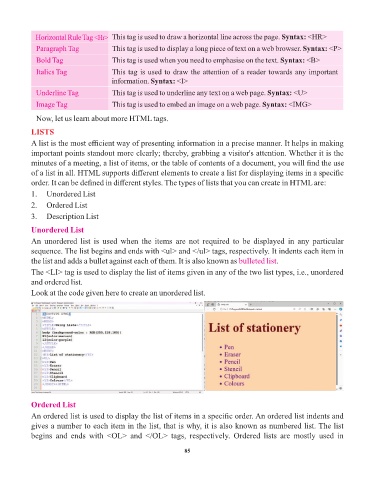
            An  unordered  list  is  used  when  the  items  are  not  required  to  be  displayed  in  any  particular

            sequence. The list begins and ends with <ul> and </ul> tags, respectively. It indents each item in
            the list and adds a bullet against each of them. It is also known as bulleted list   .
            The <LI> tag is used to display the list of items given in any of the two list types, i.e., unordered
            and ordered list.
            Look at the code given here to create an unordered list.


            Ordered List
            An ordered list is used to display the list of items in a specific order. An ordered list indents and
            gives a number to each item in the list, that is why, it is also known as numbered list. The list
            begins  and  ends  with  <OL>  and  </OL>  tags,  respectively.  Ordered  lists  are  mostly  used  in


                                                                 85

