


Page 90 - Code Craft Computer-7
P. 90
<DT> Fruits </DT>
               <DD>The mature ovaries of flowering plants that contain <BR> seeds and develop from fertilised flowers.
               <BR></DD>
               </DL>
               </BODY></HTML>


            TABLES
            Tables provide an attractive way of presenting information in the form of rows and columns. They
            are extremely popular to be used in web pages as they are quite flexible.

            Advantages of Tables
            The advantages of tables are:

            •    Tables present information or data in a comprehensive manner.
            •    Tables help in comparative analysis of data, and
            •    Information displayed in tables is easier to read and quicker to evaluate.

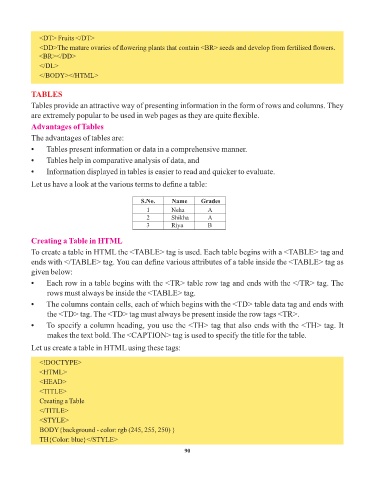
            Let us have a look at the various terms to define a table:


                                                  S.No.     Name      Grades
                                                    1       Neha         A
                                                    2       Shikha       A
                                                    3       Riya         B

            Creating a Table in HTML

            To create a table in HTML the <TABLE> tag is used. Each table begins with a <TABLE> tag and
            ends with </TABLE> tag. You can define various attributes of a table inside the <TABLE> tag as
            given below:
            •    Each row in a table begins with the <TR> table row tag and ends with the </TR> tag. The
                 rows must always be inside the <TABLE> tag.

            •    The columns contain cells, each of which begins with the <TD> table data tag and ends with
                 the <TD> tag. The <TD> tag must always be present inside the row tags <TR>.

            •    To specify a column heading, you use the <TH> tag that also ends with the <TH> tag. It
                 makes the text bold. The <CAPTION> tag is used to specify the title for the table.
            Let us create a table in HTML using these tags:


               <!DOCTYPE>
               <HTML>
               <HEAD>
               <TITLE>
               Creating a Table
               </TITLE>
               <STYLE>
               BODY{background - color: rgb (245, 255, 250) }
               TH{Color: blue}</STYLE>

                                                                 90

