


Page 91 - Code Craft Computer-7
P. 91
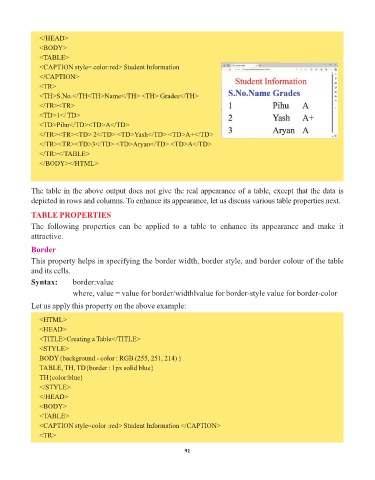
</HEAD>
               <BODY>
               <TABLE>
               <CAPTION style= color:red> Student Information
               </CAPTION>
               <TR>
               <TH>S.No.</TH<TH>Name</TH> <TH> Grades</TH>
               </TR><TR>
               <TD>1</ TD>
               <TD>Pihu</TD><TD>A</TD>
               </TR><TR><TD> 2</TD> <TD>Yash</TD> <TD>A+</TD>
               </TR><TR><TD>3</TD> <TD>Aryan</TD> <TD>A</TD>

               </TR></TABLE>
               </BODY></HTML>


            The table in the above output does not give the real appearance of a table, except that the data is

            depicted in rows and columns. To enhance its appearance, let us discuss various table properties next.

            TABLE PROPERTIES
            The  following  properties  can  be  applied  to  a  table  to  enhance  its  appearance  and  make  it
            attractive.

            Border

            This property helps in specifying the border width, border style, and border colour of the table
            and its cells.
            Syntax:       border:value

                          where, value = value for border/widthlvalue for border-style value for border-color
            Let us apply this property on the above example:

               <HTML>
               <HEAD>
               <TITLE>Creating a Table</TITLE>

               <STYLE>
               BODY{background - color : RGB (255, 251, 214) }
               TABLE, TH, TD{border : 1px solid blue}
               TH{color:blue}
               </STYLE>
               </HEAD>
               <BODY>
               <TABLE>
               <CAPTION style=color :red> Student Information </CAPTION>
               <TR>


                                                                 91

