


Page 96 - Code Craft Computer-7
P. 96
<TD style=border -color : blue>Sheena </TD>
               <TD style=border-color :blue> </TD>
               </TR>
               </TABLE></BODY></HTML>


            Height and Width

            Using these properties, you can set the height and width of the table.
            Syntax:       height:value

                          width:value
                          where, value = length in px/cm/%
            Example:   height:100px

                          width: 25%

            Padding
            This property helps in specifying the space between the border and content in a table.
            Syntax:       padding:value

                          where,  value  =  top  padding  /  right  padding  /  left  padding  /  bottom  padding  in
                          px/cm/%

            Example:   padding:2px 3px 3px 2px-----top(2px), right(3px), left(3px), bottom(2px)
                          padding:2px 3px 3px----------top(2px), right and left(3px), bottom(3px)
                          padding:2px 3px--------------- top and bottom(2px), right and left(3px)

                          padding:2px -------------------- all four paddings of 2px each

               <HTML>
               <HEAD>
               <TITLE>Table of Books</TITLE>
               <STYLE>
               BODY{background-color: RGB (255, 251, 214) }
               CAPTION{caption-side : bottom}
               TABLE, TD, TH{border: 1px solid magenta)
               TABLE{border - collapse: collapse; padding:5px; width:100%; height:30% text-align: center; background-
               color : RGB (250, 223, 223) }
               TH{color:blue}
               </STYLE></HEAD>

               <BODY >
               <TABLE>
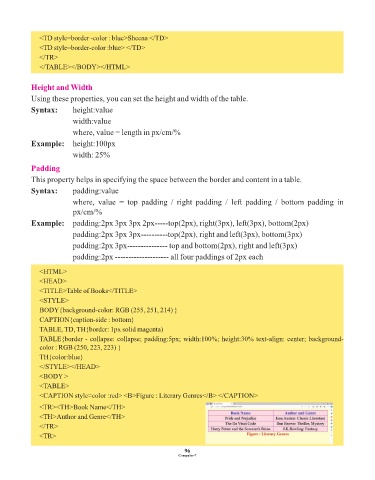
               <CAPTION style=color :red> <B>Figure : Literary Genres</B> </CAPTION>
               <TR><TH>Book Name</TH>
               <TH>Author and Genre</TH>
               </TR>

               <TR>

                                                                 96
                                                               Computer-7

