


Page 92 - Code Craft Computer-7
P. 92
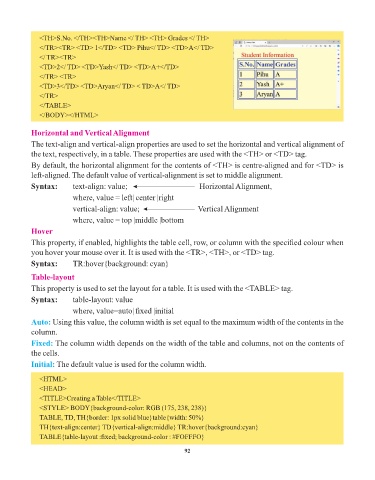
<TH>S.No. </TH><TH>Name </ TH> <TH> Grades </ TH>
               </TR><TR> <TD> 1</TD> <TD> Pihu</ TD> <TD>A</ TD>
               </ TR><TR>
               <TD>2</ TD> <TD>Yash</ TD> <TD>A+</TD>
               </TR> <TR>
               <TD>3</TD> <TD>Aryan</ TD> < TD>A</ TD>
               </TR>
               </TABLE>
               </BODY></HTML>


            Horizontal and Vertical Alignment
            The text-align and vertical-align properties are used to set the horizontal and vertical alignment of
            the text, respectively, in a table. These properties are used with the <TH> or <TD> tag.

            By default, the horizontal alignment for the contents of <TH> is centre-aligned and for <TD> is
            left-aligned. The default value of vertical-alignment is set to middle alignment.

            Syntax:       text-align: value;                          Horizontal Alignment,
                          where, value = left| center |right
                          vertical-align: value;                     Vertical Alignment

                          where, value = top |middle |bottom
            Hover

            This property, if enabled, highlights the table cell, row, or column with the specified colour when
            you hover your mouse over it. It is used with the <TR>, <TH>, or <TD> tag.
            Syntax:       TR:hover{background: cyan}

            Table-layout

            This property is used to set the layout for a table. It is used with the <TABLE> tag.
            Syntax:       table-layout: value
                          where, value=auto| fixed |initial

            Auto: Using this value, the column width is set equal to the maximum width of the contents in the
            column.
            Fixed: The column width depends on the width of the table and columns, not on the contents of

            the cells.
            Initial: The default value is used for the column width.

               <HTML>
               <HEAD>
               <TITLE>Creating a Table</TITLE>
               <STYLE> BODY{background-color: RGB (175, 238, 238)}

               TABLE, TD, TH{border: 1px solid blue}table{width: 50%}
               TH{text-align:center} TD{vertical-align:middle} TR:hover{background:cyan}
               TABLE{table-layout :fixed; background-color : #FOFFFO}

                                                                 92

