


Page 61 - 00inner.cdr
P. 61
web page as a favourite or to add it to your reading list. You can find your saved
                 reading list in the Hub.

            •    More : More is where you'll find all the extra features, such as Private mode, Zoom,
                 Print and additional settings.


                     Try It Out                                                                   #Critical Thinking


               Name the following.
               1.  This reloads your page.                                                    _______________

               2.  This is used to open a new tab.                                            _______________
               3.  This is the default web browser in the Windows 10 operating system.        _______________

               4.  This is a star icon that allows you to set a web page as a favorite.       _______________


            SEARCHING FOR SOMETHING ON INTERNET

            Search engine is a web tool which allows user to search or look up for desired information
            of the Internet. Some of the popular search engines are Google            , Yahoo , Microsoft Bing    , etc.


            Every search engine allows the user to enter a keyword related to the information or click
            on the voice button and speak what one wants to search for, and it displays a list of related

            websites.

            Search by Keyword

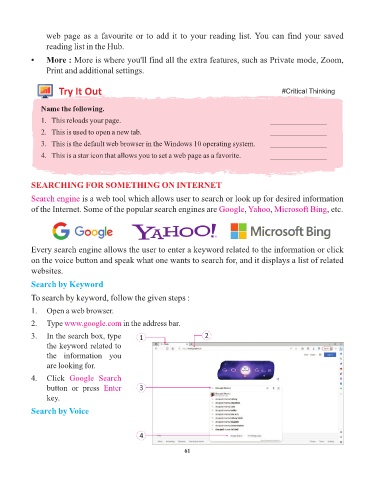
            To search by keyword, follow the given steps :
            1.   Open a web browser.

            2.   Type www.google.com        in the address bar.

            3.   In the search box, type         1                      2
                 the keyword related to
                 the  information  you
                 are looking for.

            4.   Click  Google  Search
                 button  or  press  Enter        3
                 key.

            Search by Voice


                                                 4


                                                                 61

