


Page 60 - 00inner.cdr
P. 60
MICROSOFT EDGE
                                                                              2
            Microsoft Edge is the default web browser in the
            Windows 10 operating system.

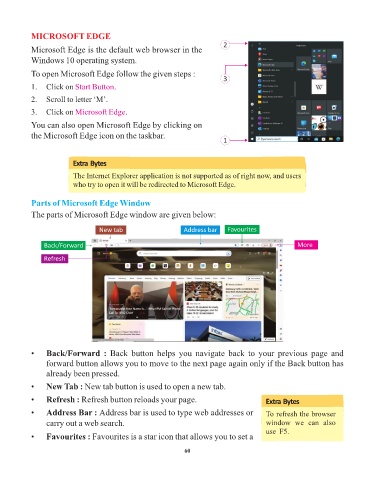
            To open Microsoft Edge follow the given steps :
                                                                              3
            1.   Click on Start Button  .

            2.   Scroll to letter ‘M’.

            3.   Click on Microsoft Edge    .
            You can also open Microsoft Edge by clicking on
            the Microsoft Edge icon on the taskbar.
                                                                              1


                          Extra Bytes

                          The Internet Explorer application is not supported as of right now, and users
                          who try to open it will be redirected to Microsoft Edge.


            Parts of Microsoft Edge Window

            The parts of Microsoft Edge window are given below:

                                   New tab                       Address bar    Favourites

                Back/Forward                                                                            More

                Refresh


            •    Back/Forward  :  Back  button  helps  you  navigate  back  to  your  previous  page  and
                 forward button allows you to move to the next page again only if the Back button has
                 already been pressed.

            •    New Tab : New tab button is used to open a new tab.

            •    Refresh : Refresh button reloads your page.                                 Extra Bytes
            •    Address Bar : Address bar is used to type web addresses or                  To refresh the browser
                 carry out a web search.                                                     window  we  can  also
                                                                                             use  F5.
            •    Favourites : Favourites is a star icon that allows you to set a

                                                                 60

