


Page 68 - Code Craft Computer-8
P. 68
CREATING A CONNECTION

            After creating the database and defining the table structure for the table in the database, you can
            connect your web app with the database. Use the following details:

               MySQL Server name: localhost
               User name: root

               Password: keep it blank
               Database name: Emp_Details
               Table name: Emp_Record


            To connect the web page to the database, follow these steps:


                    Creating a           Creating a        Creating an SQL
                 connection with       connection with      query to fetch         Executing          Displaying the
                the MySQL server        the database      data from the table      the query           query result


            Methods used to connect the web page to the database are as follows:

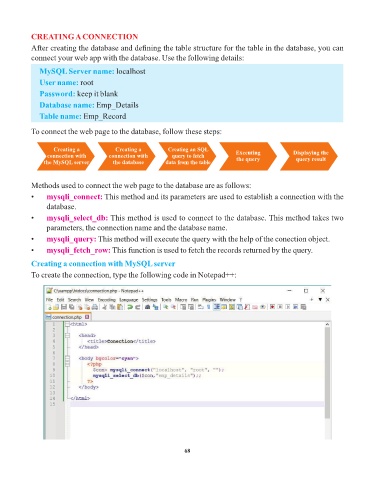
            •    mysqli_connect:      This method and its parameters are used to establish a connection with the
                 database.
            •    mysqli_select_db:     This method is used to connect to the database. This method takes two
                 parameters, the connection name and the database name.

            •    mysqli_query:     This method will execute the query with the help of the conection object.
            •    mysqli_fetch_row:      This function is used to fetch the records returned by the query.

            Creating a connection with MySQL server

            To create the connection, type the following code in Notepad++:


                                                                 68

