


Page 48 - 00inner.cdr
P. 48
USES OF A PRESENTATION

            •    A PowerPoint presentation helps you in presenting the views and ideas effectively by
                 creating a good visual impact on the audience.
            •    People in the business  world use it to present information about their products or

                 company in seminars and meetings.
            •    PowerPoint  is  an  effective  tool  to  present  and  organise  the  course  content  in  the

                 classroom to enhance the students’ learning.

            STARTING POWERPOINT
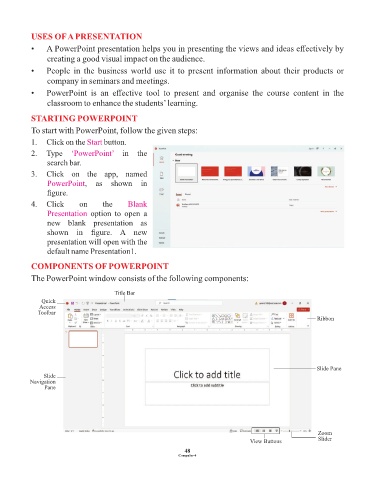
            To start with PowerPoint, follow the given steps:

            1.  Click on the Start   button.
            2.  Type  ‘PowerPoint’         in  the
                 search bar.

            3.  Click  on  the  app,  named
                 PowerPoint,  as  shown  in
                 figure.
            4.  Click       on       the     Blank
                 Presentation  option  to  open  a
                 new  blank  presentation  as

                 shown  in  figure.  A  new
                 presentation will open with the
                 default name Presentation1.

            COMPONENTS OF POWERPOINT
            The PowerPoint window consists of the following components:


                                         Title Bar
               Quick
               Access
              Toolbar
                                                                                                               Ribbon


                                                                                                               Slide Pane
                Slide
           Navigation
                Pane


                                                                                                               Zoom
                                                                                                               Slider
                                                                                       View Buttons
                                                                 48
                                                               Computer-4

