


Page 43 - 00inner.cdr
P. 43
APPLYING BORDERS AND SHADING

            To improve the appearance and reading quality of the text, you can add a variety of border
            and shading effects to the paragraphs and entire page.
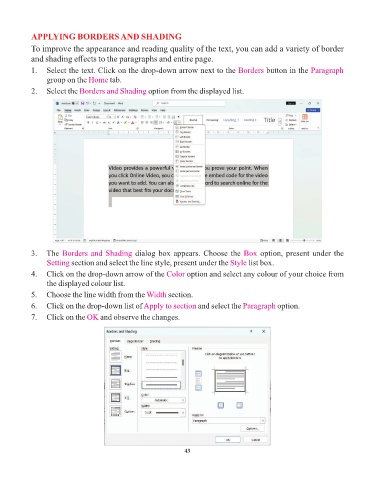
            1.  Select the text. Click on the drop-down arrow next to the Borders            button in the Paragraph
                 group on the Home     tab.

            2.  Select the Borders and Shading      option from the displayed list.


            3.   The Borders and Shading        dialog box appears. Choose the Box         option, present under the
                 Setting section and select the line style, present under the    Style list box.
            4.   Click on the drop-down arrow of the Color        option and select any colour of your choice from
                 the displayed colour list.

            5.   Choose the line width from the Width      section.
            6.   Click on the drop-down list of Apply to section     and select the Paragraph    option.

            7.   Click on the OK    and observe the changes.


                                                                 43

