


Page 41 - 00inner.cdr
P. 41
APPLYING SUPERSCRIPT AND SUBSCRIPT EFFECTS

            The Superscript    option places the selected text slightly above the baseline. On the contrary,
            the Subscript   option places the selected text slightly below the baseline and makes it appear
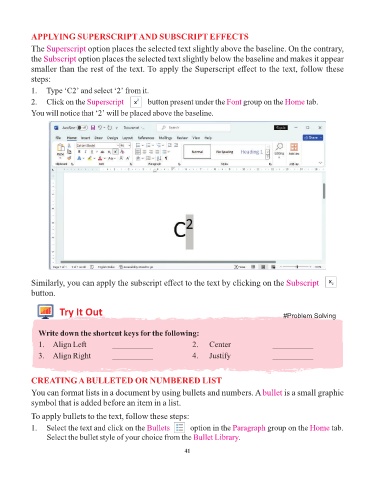
            smaller than the rest of the text. To apply the Superscript effect to the text, follow these
            steps:

            1.  Type ‘C2’ and select ‘2’ from it.
            2.  Click on the Superscript pic-15     button present under the Font    group on the Home     tab.

            You will notice that ‘2’ will be placed above the baseline.


            Similarly, you can apply the subscript effect to the text by clicking on the Subscript Pic-17
            button.


                      Try It Out
                                                                                                   #Problem Solving

              Write down the shortcut keys for the following:

              1.  Align Left            __________                 2.    Center                __________
              3.  Align Right           __________                 4.    Justify               __________


            CREATING A BULLETED OR NUMBERED LIST

            You can format lists in a document by using bullets and numbers. A bullet              is a small graphic
            symbol that is added before an item in a list.

            To apply bullets to the text, follow these steps:

            1.   Select the text and click on the Bullets    pic-8  option in the Paragraph  group on the Home      tab.
                 Select the bullet style of your choice from the Bullet Library    .

                                                                 41

