


Page 38 - 00inner.cdr
P. 38
CHANGING THE FONT TYPE AND SIZE
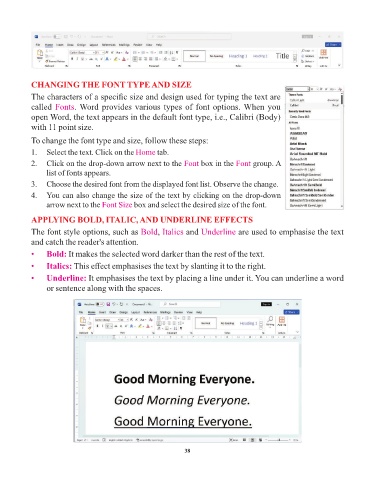
            The characters of a specific size and design used for typing the text are
            called Fonts   . Word provides various types of font options. When you
            open Word, the text appears in the default font type, i.e., Calibri (Body)

            with 11 point size.

            To change the font type and size, follow these steps:
            1.  Select the text. Click on the Home     tab.

            2.  Click on the drop-down arrow next to the Font          box in the Font  group. A
                 list of fonts appears.
            3.  Choose the desired font from the displayed font list. Observe the change.

            4.  You can also change the size of the text by clicking on the drop-down
                 arrow next to the Font Size   box and select the desired size of the font.

            APPLYING BOLD, ITALIC, AND UNDERLINE EFFECTS
            The font style options, such as Bold        , Italics  and Underline    are used to emphasise the text

            and catch the reader's attention.
            •    Bold: It makes the selected word darker than the rest of the text.

            •    Italics: This effect emphasises the text by slanting it to the right.
            •    Underline: It emphasises the text by placing a line under it. You can underline a word
                 or sentence along with the spaces.


                                                                 38

