


Page 54 - 00inner.cdr
P. 54
CLOSING A PRESENTATION

            To close the presentation, click on the File        tab. Select the Close     option or press Ctrl + W     .
            The presentation will be closed, but the PowerPoint application window will remain open.

            EXIT POWERPOINT

            To exit PowerPoint, click on the Close           button on the Title bar      or use the Alt + F4       key
            combination.


            OPENING A PRESENTATION
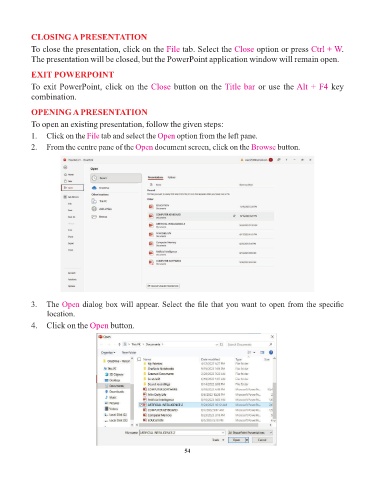
            To open an existing presentation, follow the given steps:

            1.  Click on the File   tab and select the Open   option from the left pane.
            2.  From the centre pane of the Open      document screen, click on the Browse       button.


            3.  The Open      dialog box will appear. Select the file that you want to open from the specific
                 location.

            4.  Click on the Open      button.


                                                                 54

