


Page 46 - 00inner.cdr
P. 46
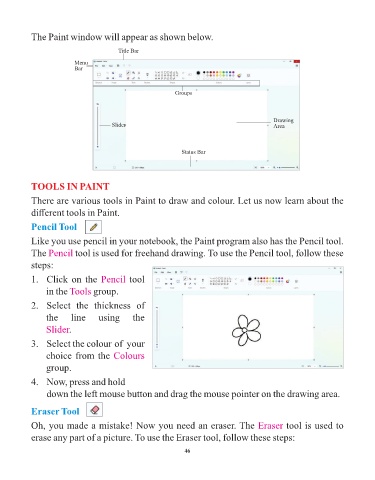
The Paint window will appear as shown below.

                                          Title Bar

                           Menu
                           Bar


                                                              Groups


                                                                                                Drawing
                                        Slider                                                  Area


                                                                Status Bar


            TOOLS IN PAINT
            There are various tools in Paint to draw and colour. Let us now learn about the

            different tools in Paint.

            Pencil Tool

            Like you use pencil in your notebook, the Paint program also has the Pencil tool.

            The Pencil     tool is used for freehand drawing. To use the Pencil tool, follow these
            steps:

            1.   Click on the Pencil          tool

                 in the Tools    group.

            2.   Select  the  thickness  of

                 the      line     using       the
                 Slider.

            3.   Select the colour  of  your

                 choice from the Colours
                 group.


            4.   Now, press and hold
                 down the left mouse button and drag the mouse pointer on the drawing area.


            Eraser Tool

            Oh, you made a mistake! Now you need an eraser. The Eraser                              tool is used to

            erase any part of a picture. To use the Eraser tool, follow these steps:

                                                                 46

