


Page 41 - 00inner.cdr
P. 41
CHANGING THE COLOUR OF THE TEXT

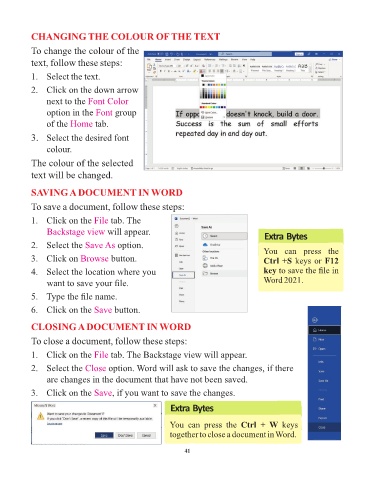
            To change the colour of the

            text, follow these steps:

            1.   Select the text.

            2.   Click on the down arrow
                 next to the Font Color

                 option in the Font      group
                 of the Home      tab.

            3.   Select the desired font

                 colour.
            The colour of the selected

            text will be changed.


            SAVING A DOCUMENT IN WORD

            To save a document, follow these steps:

            1.   Click on the File     tab. The
                 Backstage view will appear.
                                                                                            Extra Bytes
            2.   Select the Save As       option.
                                                                                            You  can  press  the
            3.   Click on Browse       button.                                              Ctrl +S keys or F12

            4.   Select the location where you                                              key to save the file in
                 want to save your file.                                                     Word 2021.

            5.   Type the file name.

            6.   Click on the Save       button.


            CLOSING A DOCUMENT IN WORD

            To close a document, follow these steps:

            1.   Click on the File     tab. The Backstage view will appear.

            2.   Select the Close      option. Word will ask to save the changes, if there
                 are changes in the document that have not been saved.

            3.   Click on the Save      , if you want to save the changes.

                                                            Extra Bytes


                                                            You  can  press  the  Ctrl  +  W  keys
                                                            together to close a document in Word.


                                                                 41

