


Page 36 - 00inner.cdr
P. 36
•    You can highlight important words or lines in bold, italic or/and underline.

            •    You can change the font as well as font colour of the text in a document.

            •    You can search words or parts of words and replace them with other words.

            •    You can easily number the pages.

            •    You can put margins in a page.

            INTRODUCTION TO MS WORD 2021

            Word  2021  is  an  application

            software         used       for      word

            processing.  To  start  MS  Word
            2021, follow these steps:

            1.  Click on the Start      button.

            2.  Now,  click  on  the  All  apps

                 button.
            3.  Then,  click  on  the  Word

                 option.


            This opens Word 2021 start screen.
            Now,  select  the  Blank  document

            option to create a new document.


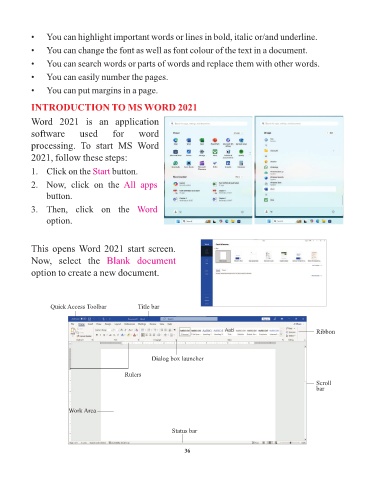
                  Quick Access Toolbar           Title bar


                                                                                                              Ribbon


                                                     Dialog box launcher

                                            Rulers
                                                                                                              Scroll
                                                                                                              bar


                         Work Area


                                                            Status bar


                                                                 36

