


Page 19 - 00inner.cdr
P. 19
3               Paint 3D


                                     for Beginners


                           Core Concepts


                          On completion of this chapter you will be able to know:
                          ¨  Paint 3D                                      ¨  Starting Paint 3D
                          ¨  Components of Paint 3D Window                 ¨  Creating 2D Shapes

                          ¨  Creating 3D Shapes                            ¨  Selecting a Shape
                          ¨  Changing Colour of a Shape                    ¨  Adding Text
                          ¨  Saving the Drawing                            ¨  Opening a Saved Drawing

                   Warm Up                                                                         #Art Integration


                 Draw and colour the logo of Paint 3D in the space given below.


            Paint 3D is a software in which you can draw such 3D shapes. Let us learn more
            about this program.

            PAINT 3D

            With  all  the  earlier  versions  of Windows,  Microsoft  had  included  a  simple  Paint
            program. You already know how to work on it. You have created beautiful drawings

            on it. In Windows 10, a new version of Paint, called Paint 3D has been included. In
            Paint 3D, you can create and edit 3D images.


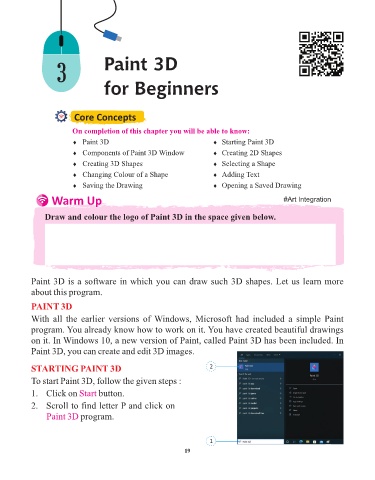
            STARTING PAINT 3D                                            2
            To start Paint 3D, follow the given steps :

            1.   Click on Start    button.

            2.   Scroll to find letter P and click on
                 Paint 3D program.


                                                                         1

                                                                 19

