


Page 23 - 00inner.cdr
P. 23
CHANGING COLOUR OF A SHAPE

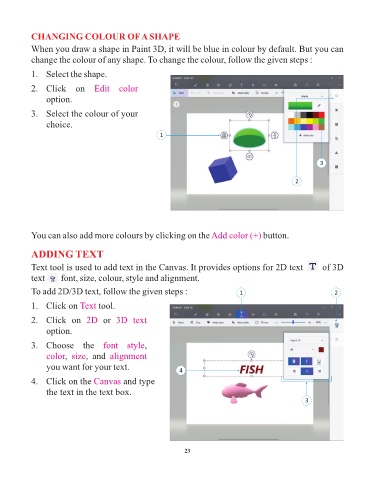
            When you draw a shape in Paint 3D, it will be blue in colour by default. But you can
            change the colour of any shape. To change the colour, follow the given steps :

            1.   Select the shape.

            2.   Click  on  Edit  color

                 option.

            3.   Select the colour of your
                 choice.
                                                        1


                                                                                                                3


                                                                                                       2


            You can also add more colours by clicking on the Add color (+)                  button.


            ADDING TEXT

            Text tool is used to add text in the Canvas. It provides options for 2D text       of 3D
            text       font, size, colour, style and alignment.

            To add 2D/3D text, follow the given steps :                             1                                2

            1.   Click on Text     tool.

            2.   Click  on  2D       or  3D  text

                 option.

            3.   Choose  the  font  style          ,
                 color size,  and      alignment
                       ,
                 you want for your text.                       4


            4.   Click on the Canvas        and type
                 the text in the text box.
                                                                                                          3


                                                                 23

