


Page 20 - 00inner.cdr
P. 20
3.  Click on New        option to create a new

                 drawing.


                                                                 3


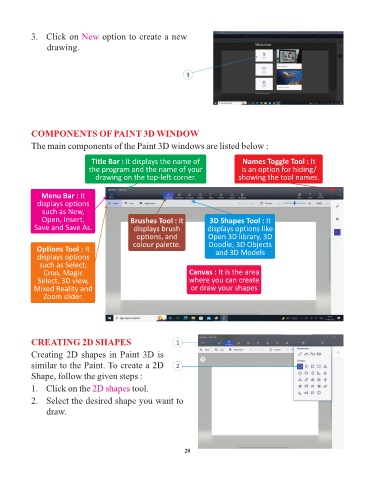
            COMPONENTS OF PAINT 3D WINDOW

            The main components of the Paint 3D windows are listed below :

                                 Title Bar : It displays the name of                 Names Toggle Tool : It
                                the program and the name of your                    is an option for hiding/
                                  drawing on the top-left corner.                  showing the tool names.


               Menu Bar : It
              displays options
                such as New,
               Open, Insert,                  Brushes Tool : It          3D Shapes Tool : It
             Save and Save As.                 displays brush            displays options like
                                                options, and             Open 3D library, 3D
                                               colour palette.           Doodle, 3D Objects
              Options Tool : It                                            and 3D Models
              displays options
               such as Select,
                Crop, Magic                                       Canvas : It is the area
              Select, 3D view,                                    where you can create
             Mixed Reality and                                     or draw your shapes
                Zoom slider.


            CREATING 2D SHAPES                                1

            Creating 2D shapes in Paint 3D is
            similar to the Paint. To create a 2D              2
            Shape, follow the given steps :

            1.   Click on the 2D shapes        tool.

            2.   Select the desired shape you want to
                 draw.


                                                                 20

