


Page 24 - 00inner.cdr
P. 24
When you have completed typing the text, click anywhere outside the text box. This

            will open the section tools where you can rotate the text using rotation handles and
            change the colour of the text using the Edit color              button just like you did for the 3D
            shapes.


                       Try It Out                                                                  #Critical Thinking


                 Name the tools.

                 1.  It opens up color palette and brush options.                                      ________
                 2.   It displays the name of the program and the name of your drawing.  ________

                 3.   It opens 3D library and options to draw 3D shapes.                               ________


            SAVING THE DRAWING

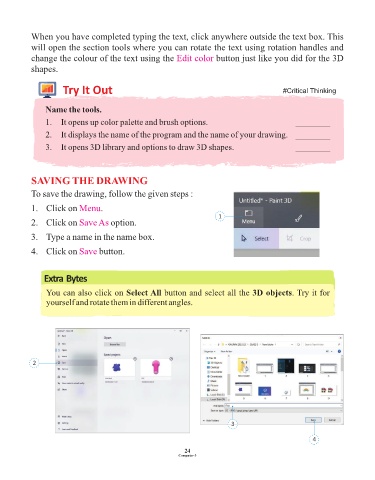
            To save the drawing, follow the given steps :

            1.  Click on Menu       .
                                                                             1
            2.  Click on Save As       option.

            3.  Type a name in the name box.


            4.  Click on Save      button.


                Extra Bytes

                 You can also click on Select All button and select all the 3D objects. Try it for
                 yourself and rotate them in different angles.


            2


                                                                                 3

                                                                                                             4

                                                                 24
                                                               Computer-3

