


Page 25 - 00inner.cdr
P. 25
OPENING A SAVED DRAWING

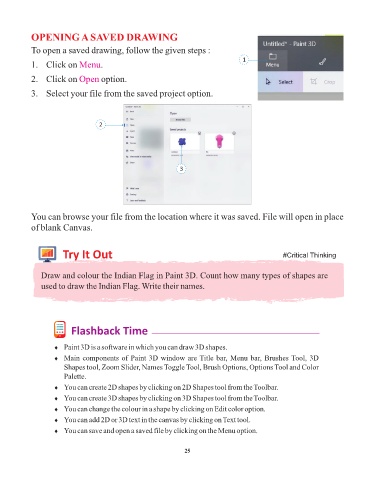
            To open a saved drawing, follow the given steps :
                                                                                     1
            1.  Click on Menu       .

            2.  Click on Open       option.

            3.  Select your file from the saved project option.


                                   2


                                                               3


            You can browse your file from the location where it was saved. File will open in place
            of blank Canvas.


                       Try It Out                                                                  #Critical Thinking


               Draw and colour the Indian Flag in Paint 3D. Count how many types of shapes are
               used to draw the Indian Flag. Write their names.


                          Flashback Time


                    ¨  Paint 3D is a software in which you can draw 3D shapes.

                    ¨  Main components of Paint 3D window are Title bar, Menu bar, Brushes Tool, 3D
                       Shapes tool, Zoom Slider, Names Toggle Tool, Brush Options, Options Tool and Color
                       Palette.

                    ¨  You can create 2D shapes by clicking on 2D Shapes tool from the Toolbar.
                    ¨  You can create 3D shapes by clicking on 3D Shapes tool from the Toolbar.

                    ¨  You can change the colour in a shape by clicking on Edit color option.
                    ¨  You can add 2D or 3D text in the canvas by clicking on Text tool.
                    ¨  You can save and open a saved file by clicking on the Menu option.


                                                                 25

