


Page 22 - 00inner.cdr
P. 22
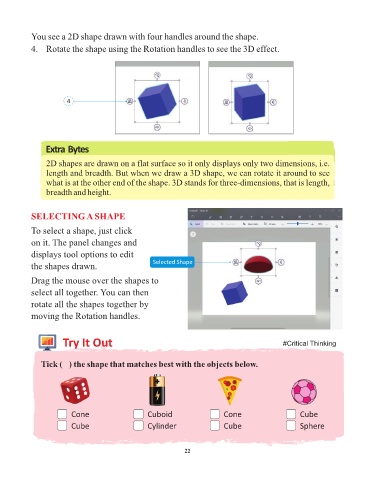
You see a 2D shape drawn with four handles around the shape.

            4.  Rotate the shape using the Rotation handles to see the 3D effect.


                        4


                 Extra Bytes

                 2D shapes are drawn on a flat surface so it only displays only two dimensions, i.e.

                 length and breadth. But when we draw a 3D shape, we can rotate it around to see
                 what is at the other end of the shape. 3D stands for three-dimensions, that is length,
                 breadth and height.


            SELECTING A SHAPE

            To select a shape, just click

            on it. The panel changes and
            displays tool options to edit
                                                      Selected Shape
            the shapes drawn.

            Drag the mouse over the shapes to
            select all together. You can then

            rotate all the shapes together by
            moving the Rotation handles.


                       Try It Out                                                                  #Critical Thinking


               Tick (3) the shape that matches best with the objects below.


                          Cone                      Cuboid                    Cone                       Cube

                          Cube                      Cylinder                  Cube                       Sphere


                                                                 22

