


Page 33 - 00inner.cdr
P. 33
SORTING THE ICONS

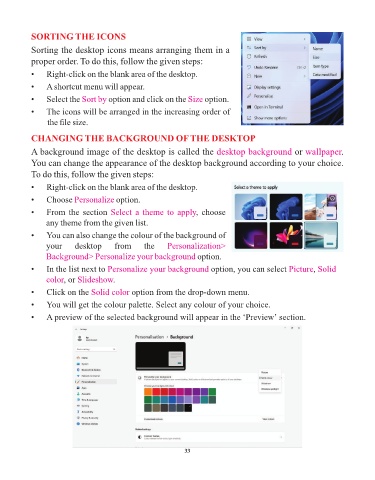
            Sorting the desktop icons means arranging them in a
            proper order. To do this, follow the given steps:

            •    Right-click on the blank area of the desktop.

            •    A shortcut menu will appear.

            •    Select the Sort by    option and click on the Size     option.
            •    The icons will be arranged in the increasing order of

                 the file size.

            CHANGING THE BACKGROUND OF THE DESKTOP

            A background image of the desktop is called the desktop background                         or wallpaper    .
            You can change the appearance of the desktop background according to your choice.

            To do this, follow the given steps:

            •    Right-click on the blank area of the desktop.
            •    Choose Personalize      option.

            •    From the section Select a theme to apply            , choose
                 any theme from the given list.

            •    You can also change the colour of the background of
                 your      desktop       from      the     Personalization>

                 Background> Personalize your background option.
            •    In the list next to Personalize your background          option, you can select Picture     , Solid

                 color, or  Slideshow.
            •    Click on the Solid color      option from the drop-down menu.

            •    You will get the colour palette. Select any colour of your choice.

            •    A preview of the selected background will appear in the ‘Preview’ section.


                                                                 33

