


Page 50 - 00inner.cdr
P. 50
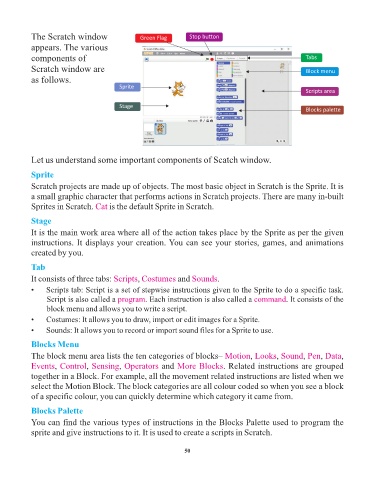
The Scratch window                   Green Flag        Stop button

            appears. The various
            components of                                                                                  Tabs
            Scratch window are                                                                             Block menu
            as follows.
                                          Sprite
                                                                                                           Scripts area

                                          Stage
                                                                                                           Blocks palette


            Let us understand some important components of Scatch window.

            Sprite

            Scratch projects are made up of objects. The most basic object in Scratch is the Sprite. It is
            a small graphic character that performs actions in Scratch projects. There are many in-built
            Sprites in Scratch. Cat    is the default Sprite in Scratch.

            Stage
            It is the main work area where all of the action takes place by the Sprite as per the given

            instructions. It displays your creation. You can see your stories, games, and animations
            created by you.

            Tab
            It consists of three tabs: Scripts   , Costumes    and Sounds   .

            •    Scripts tab: Script is a set of stepwise instructions given to the Sprite to do a specific task.
                 Script is also called a program   . Each instruction is also called a command      . It consists of the
                 block menu and allows you to write a script.
            •    Costumes: It allows you to draw, import or edit images for a Sprite.
            •    Sounds: It allows you to record or import sound files for a Sprite to use.


            Blocks Menu
            The block menu area lists the ten categories of blocks– Motion              , Looks  , Sound  , Pen , Data ,
                               ,
                    ,
            Events Control Sensing Operators and              More Blocks. Related instructions are grouped
                                          ,
            together in a Block. For example, all the movement related instructions are listed when we
            select the Motion Block. The block categories are all colour coded so when you see a block
            of a specific colour, you can quickly determine which category it came from.

            Blocks Palette
            You can find the various types of instructions in the Blocks Palette used to program the
            sprite and give instructions to it. It is used to create a scripts in Scratch.


                                                                 50


                  Tech Et ique e


                ¨  Always press the keys of the keyboard gently.


                          Flashback Time


                       Try It Out                                                                  #Problem Solving

