


Page 55 - 00inner.cdr
P. 55
Pictorial-Based Learning

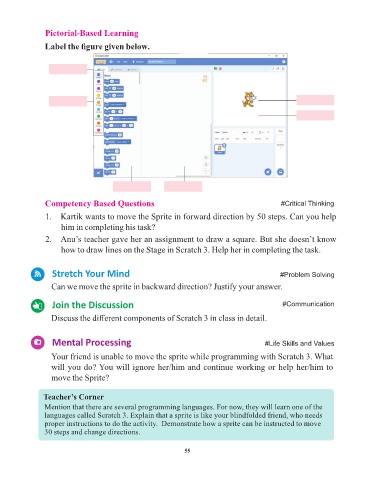
                 Label the figure given below.


                            Tab


                    Blocks Panel                                                                         Sprite
                                                                                                         Stage


                                         Blocks Palette     Scripts Area

                 Competency Based Questions                                                       #Critical Thinking

                 1.   Kartik wants to move the Sprite in forward direction by 50 steps. Can you help
                      him in completing his task?

                 2.  Anu’s teacher gave her an assignment to draw a square. But she doesn’t know
                      how to draw lines on the Stage in Scratch 3. Help her in completing the task.


                   Stretch Your Mind                                                              #Problem Solving

                   Can we move the sprite in backward direction? Justify your answer.


                   Join the Discussion                                                             #Communication

                   Discuss the different components of Scratch 3 in class in detail.


                   Mental Processing                                                         #Life Skills and Values

                   Your friend is unable to move the sprite while programming with Scratch 3. What
                   will you do? You will ignore her/him and continue working or help her/him to

                   move the Sprite?


                Teacher’s Corner
                Mention that there are several programming languages. For now, they will learn one of the
                languages called Scratch 3. Explain that a sprite is like your blindfolded friend, who needs
                proper instructions to do the activity.  Demonstrate how a sprite can be instructed to move
                30 steps and change directions.


                                                                 55


                  Tech Et ique e


                ¨  Always press the keys of the keyboard gently.


                          Flashback Time


                       Try It Out                                                                  #Problem Solving

