


Page 20 - 00inner.cdr
P. 20
•    Windows key + S: This shortcut opens the Windows 11 Search function. It enables you to
                 quickly search for files, apps, settings and even web results from your computer. It saves
                 time by providing instant access to the information you need without navigating through
                 different menus.

            USING CONTROL PANEL

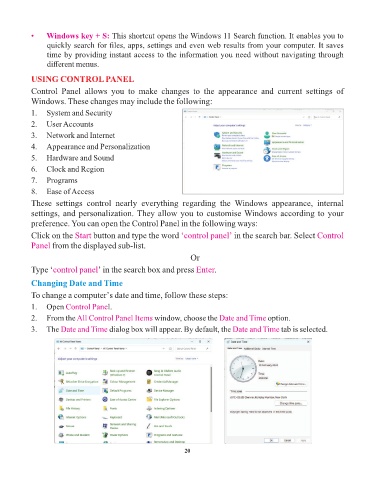
            Control  Panel  allows  you  to  make  changes  to  the  appearance  and  current  settings  of
            Windows. These changes may include the following:

            1.  System and Security
            2.  User Accounts
            3.  Network and Internet

            4.  Appearance and Personalization
            5.  Hardware and Sound

            6.  Clock and Region
            7.  Programs

            8.  Ease of Access
            These  settings  control  nearly  everything  regarding  the  Windows  appearance,  internal
            settings, and personalization. They allow you to customise Windows according to your

            preference. You can open the Control Panel in the following ways:
            Click on the Start   button and type the word ‘control panel’         in the search bar. Select Control
            Panel from the displayed sub-list.

                                                                   Or

            Type ‘control panel    ’ in the search box and press Enter     .
            Changing Date and Time

            To change a computer’s date and time, follow these steps:

            1.   Open Control Pane    l.
            2.   From the All Control Panel Items     window, choose the Date and Time        option.
            3.   The Date and Time     dialog box will appear. By default, the Date and Time       tab is selected.


                                                                 20

