


Page 29 - Code Craft Computer-7
P. 29
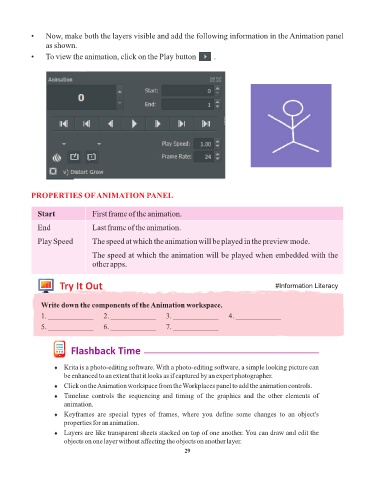
•    Now, make both the layers visible and add the following information in the Animation panel
                 as shown.

            •    To view the animation, click on the Play button         .


            PROPERTIES OF ANIMATION PANEL


              Start              First frame of the animation.
              End                Last frame of the animation.

              Play Speed         The speed at which the animation will be played in the preview mode.

                                 The speed at which the animation will be played when embedded with the
                                 other apps.


                      Try It Out                                                                #Information Literacy


               Write down the components of the Animation workspace.

               1. ____________       2. ____________      3. ____________       4. ____________
               5. ____________       6. ____________      7. ____________


                          Flashback Time


                    ¨  Krita is a photo-editing software. With a photo-editing software, a simple looking picture can
                       be enhanced to an extent that it looks as if captured by an expert photographer.

                    ¨  Click on the Animation workspace from the Workplaces panel to add the animation controls.
                    ¨  Timeline  controls  the  sequencing  and  timing  of  the  graphics  and  the  other  elements  of
                       animation.
                    ¨  Keyframes  are  special  types  of  frames,  where  you  define  some  changes  to  an  object's
                       properties for an animation.
                    ¨  Layers are like transparent sheets stacked on top of one another. You can draw and edit the
                       objects on one layer without affecting the objects on another layer.
                                                                 29

