


Page 58 - 00inner.cdr
P. 58
Try It Out                                                                  #Problem Solving


              Match the connections.

                                                  Motion Blocks Category
                                                    End Blocks Category

                                                  Control Blocks Category

                                                  Looks Blocks Category

                                                Triggering Blocks Category

                                                  Sound Blocks Category


            HOW TO MOVE AND JUMP A CHARACTER?

            Let us move and hop the character

            on the stage.

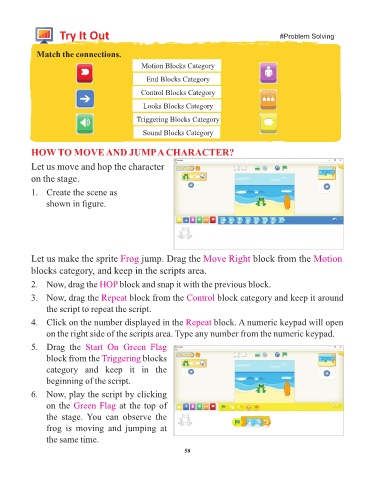
            1.  Create the scene as
                 shown in figure.


            Let us make the sprite Frog           jump. Drag the Move Right             block from the Motion

            blocks category, and keep in the scripts area.

            2.  Now, drag the HOP          block and snap it with the previous block.

            3.  Now, drag the Repeat          block from the Control        block category and keep it around
                 the script to repeat the script.

            4.  Click on the number displayed in the Repeat                block. A numeric keypad will open
                 on the right side of the scripts area. Type any number from the numeric keypad.

            5.  Drag  the  Start  On  Green  Flag
                 block from the Triggering        blocks

                 category  and  keep  it  in  the
                 beginning of the script.

            6.  Now, play the script by clicking

                 on the Green Flag        at the top of
                 the  stage.  You  can  observe  the

                 frog  is  moving  and  jumping  at
                 the same time.

                                                                 58

