


Page 69 - 00inner.cdr
P. 69
Control Blocks used in the project

                                                     This block makes the script wait for specified number of

                                                     seconds and then continues with the next block.


            REPEATING ACTIONS


                               Block


            The Repeat    block of the Control     category of the block menu is used to repeat the actions of
            the sprite as many times as needed. This block runs the blocks inside it a specified number
            of times. The Repeat instructions control the execution of the program.
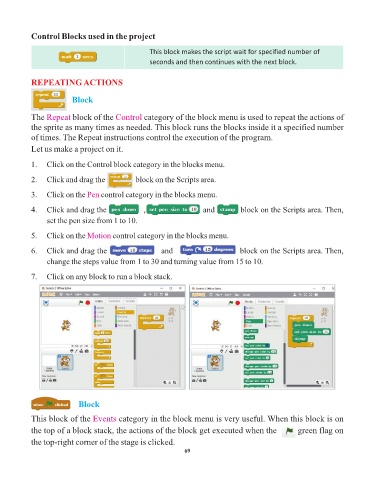
            Let us make a project on it.


            1.   Click on the Control block category in the blocks menu.

            2.   Click and drag the aaaaaaa     block on the Scripts area.

            3.   Click on the Pen   control category in the blocks menu.


            4.   Click and drag the aaaaaaa        , aaaaaaaaaaaa      and aaaaaa   block on the Scripts area. Then,
                 set the pen size from 1 to 10.

            5.   Click on the Motion    control category in the blocks menu.

            6.   Click and drag the aaaaaaaa             and aaaaa                   block on the Scripts area. Then,

                 change the steps value from 1 to 30 and turning value from 15 to 10.

            7.   Click on any block to run a block stack.


                                  Block


            This block of the Events      category in the block menu is very useful. When this block is on
            the top of a block stack, the actions of the block get executed when the        green flag on

            the top-right corner of the stage is clicked.
                                                                 69

