


Page 44 - Code Craft Computer-7
P. 44
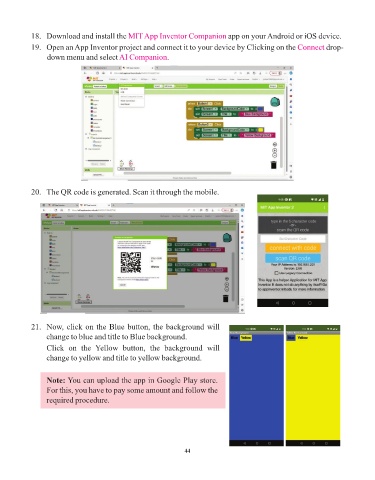
18.   Download and install the MIT App Inventor Companion           app on your Android or iOS device.

            19.   Open an App Inventor project and connect it to your device by Clicking on the Connect           drop-
                 down menu and select AI Companion         .


            20.   The QR code is generated. Scan it through the mobile.


            21.   Now, click on the Blue button, the background will
                 change to blue and title to Blue background.
                 Click  on  the  Yellow  button,  the  background  will
                 change to yellow and title to yellow background.


                 Note: You can upload the app in Google Play store.

                 For this, you have to pay some amount and follow the
                 required procedure.


                                                                 44

