


Page 33 - Code Craft Computer-8
P. 33
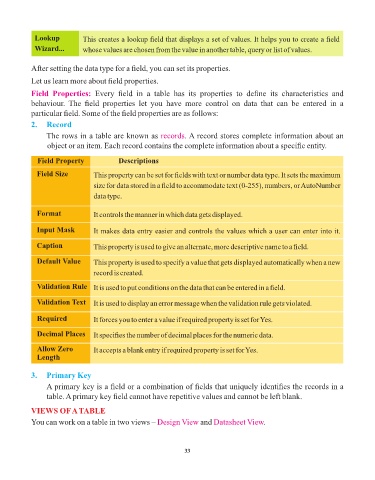
Lookup           This creates a lookup field that displays a set of values. It helps you to create a field
             Wizard...        whose values are chosen from the value in another table, query or list of values.


            After setting the data type for a field, you can set its properties.

            Let us learn more about field properties.

            Field  Properties:  Every  field  in  a  table  has  its  properties  to  define  its  characteristics  and
            behaviour.  The  field  properties  let  you  have  more  control  on  data  that  can  be  entered  in  a
            particular field. Some of the field properties are as follows:
            2.  Record

                 The rows in a table are known as records        . A record stores complete information about an
                 object or an item. Each record contains the complete information about a specific entity.

              Field Property              Descriptions

              Field Size         This property can be set for fields with text or number data type. It sets the maximum
                                 size for data stored in a field to accommodate text (0-255), numbers, or AutoNumber

                                 data type.


              Format             It controls the manner in which data gets displayed.

              Input Mask         It makes data entry easier and controls the values which a user can enter into it.

              Caption            This property is used to give an alternate, more descriptive name to a field.


              Default Value      This property is used to specify a value that gets displayed automatically when a new
                                 record is created.

              Validation Rule    It is used to put conditions on the data that can be entered in a field.


              Validation Text    It is used to display an error message when the validation rule gets violated.

              Required           It forces you to enter a value if required property is set for Yes.

              Decimal Places     It specifies the number of decimal places for the numeric data.


              Allow Zero         It accepts a blank entry if required property is set for Yes.
              Length


            3.   Primary Key

                 A primary key is a field or a combination of fields that uniquely identifies the records in a
                 table. A primary key field cannot have repetitive values and cannot be left blank.

            VIEWS OF A TABLE
            You can work on a table in two views – Design View        and Datasheet View    .


                                                                 33

