


Page 53 - Code Craft Computer-8
P. 53
<LI> It is a GUI (Graphical User Interface) based operating system as graphics are used in it to
            communicate with a computer.

            <LI> It uses WYSIWYG (What You See Is What You Get), i.e. what is appears on the screen, the
            same will be the output.

            <LI> It helps us to do many things at a time.
            <LI> It is very user-friendly, i.e. easy to learn and use.

            </UL>

            </BODY>

            </HTML>

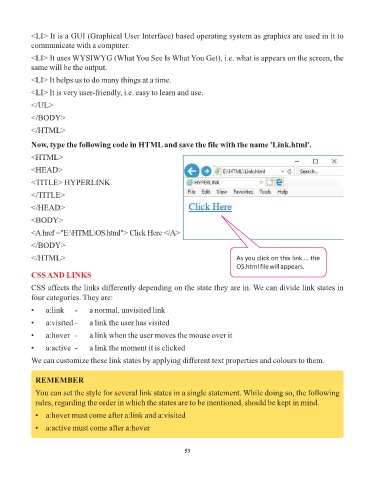
            Now, type the following code in HTML and save the file with the name 'Link.html'.
            <HTML>

            <HEAD>

            <TITLE> HYPERLINK
            </TITLE>

            </HEAD>

            <BODY>

            <A href ="E:\HTML\OS.html"> Click Here </A>
            </BODY>

            </HTML>                                                                As you click on this link…. the
                                                                                   OS.html file will appears.
            CSS AND LINKS
            CSS affects the links differently depending on the state they are in. We can divide link states in

            four categories. They are:
            •    a:link    -    a normal, unvisited link

            •    a:visited -    a link the user has visited

            •    a:hover  -     a link when the user moves the mouse over it
            •    a:active  -    a link the moment it is clicked

            We can customize these link states by applying different text properties and colours to them.


             REMEMBER

             You can set the style for several link states in a single statement. While doing so, the following
             rules, regarding the order in which the states are to be mentioned, should be kept in mind.

             •  a:hover must come after a:link and a:visited

             •  a:active must come after a:hover


                                                                 53

