


Page 54 - Code Craft Computer-8
P. 54
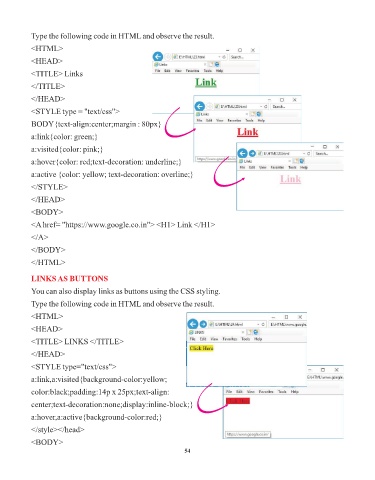
Type the following code in HTML and observe the result.

            <HTML>
            <HEAD>

            <TITLE> Links

            </TITLE>

            </HEAD>
            <STYLE type = "text/css">

            BODY{text-align:center;margin : 80px}

            a:link{color: green;}

            a:visited{color: pink;}
            a:hover{color: red;text-decoration: underline;}

            a:active {color: yellow; text-decoration: overline;}

            </STYLE>
            </HEAD>

            <BODY>

            <A href= "https://www.google.co.in"> <H1> Link </H1>
            </A>

            </BODY>

            </HTML>


            LINKS AS BUTTONS
            You can also display links as buttons using the CSS styling.

            Type the following code in HTML and observe the result.

            <HTML>
            <HEAD>

            <TITLE> LINKS </TITLE>

            </HEAD>
            <STYLE type="text/css">

            a:link,a:visited{background-color:yellow;

            color:black;padding:14p x 25px;text-align:
            center;text-decoration:none;display:inline-block;}

            a:hover,a:active{background-color:red;}

            </style></head>

            <BODY>
                                                                 54

