


Page 59 - Code Craft Computer-8
P. 59
where value = thin, thick, medium, or a numeric value indicated in pixels.

            •    border-style: value
            where value= none, hidden, dotted, dashed, solid, double, groove, ridge, inset, or outset

            •    border-color: value

            where value= name of the color or its corresponding hexadecimal code

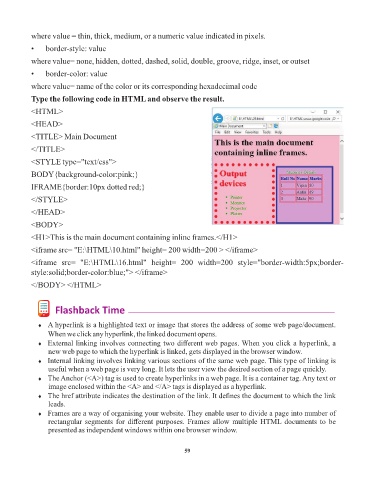
            Type the following code in HTML and observe the result.
            <HTML>

            <HEAD>

            <TITLE> Main Document

            </TITLE>
            <STYLE type="text/css">

            BODY{background-color:pink;}

            IFRAME{border:10px dotted red;}
            </STYLE>

            </HEAD>

            <BODY>
            <H1>This is the main document containing inline frames.</H1>

            <iframe src= "E:\HTML\10.html" height= 200 width=200 > </iframe>

            <iframe  src=  "E:\HTML\16.html"  height=  200  width=200  style="border-width:5px;border-
            style:solid;border-color:blue;"> </iframe>

            </BODY> </HTML>


                    Flashback Time

              ¨  A hyperlink is a highlighted text or image that stores the address of some web page/document.
                  When we click any hyperlink, the linked document opens.
              ¨  External linking involves connecting two different web pages. When you click a hyperlink, a
                  new web page to which the hyperlink is linked, gets displayed in the browser window.
              ¨  Internal linking involves linking various sections of the same web page. This type of linking is
                  useful when a web page is very long. It lets the user view the desired section of a page quickly.
              ¨  The Anchor (<A>) tag is used to create hyperlinks in a web page. It is a container tag. Any text or
                  image enclosed within the <A> and </A> tags is displayed as a hyperlink.
              ¨  The href attribute indicates the destination of the link. It defines the document to which the link
                  leads.
              ¨  Frames are a way of organising your website. They enable user to divide a page into number of
                  rectangular segments for different purposes. Frames allow multiple HTML documents to be
                  presented as independent windows within one browser window.


                                                                 59

