


Page 14 - Code Craft Computer-7
P. 14
Using a Formula

            There are two methods to enter formula in a cell:
            •    Entering formula in a cell directly
            •    Entering formula in the Formula bar

            Let us learn to use both the methods.

            Entering Formula in a Cell: To enter the formula directly in a cell, follow the given steps:
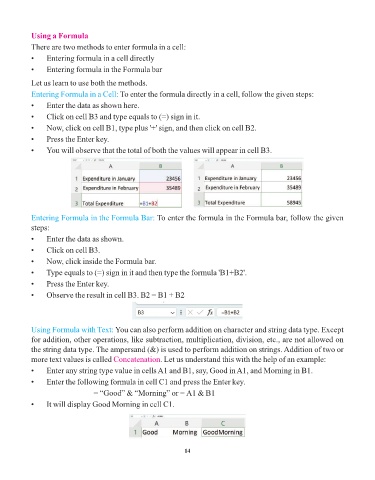
            •    Enter the data as shown here.
            •    Click on cell B3 and type equals to (=) sign in it.

            •    Now, click on cell B1, type plus '+' sign, and then click on cell B2.
            •    Press the Enter key.

            •    You will observe that the total of both the values will appear in cell B3.


            Entering Formula in the Formula Bar: To enter the formula in the Formula bar, follow the given
            steps:

            •    Enter the data as shown.
            •    Click on cell B3.

            •    Now, click inside the Formula bar.
            •    Type equals to (=) sign in it and then type the formula 'B1+B2'.
            •    Press the Enter key.

            •    Observe the result in cell B3. B2 = B1 + B2


            Using Formula with Text: You can also perform addition on character and string data type. Except

            for addition, other operations, like subtraction, multiplication, division, etc., are not allowed on
            the string data type. The ampersand (&) is used to perform addition on strings. Addition of two or
            more text values is called Concatenation    . Let us understand this with the help of an example:
            •    Enter any string type value in cells A1 and B1, say, Good in A1, and Morning in B1.

            •    Enter the following formula in cell C1 and press the Enter key.
                                 = “Good” & “Morning” or = A1 & B1
            •    It will display Good Morning in cell C1.


                                                                 14

