


Page 19 - Code Craft Computer-7
P. 19
Logical Functions

            Excel provides a wide range of logical functions that help you to make decisions based on logic
            situations. Let us discuss the logical function, named IF() function.
            Using IF() Function: The IF() function evaluates the given condition. It returns one value if the
            condition is true and another value if the condition is false. Let us see the use of IF function:

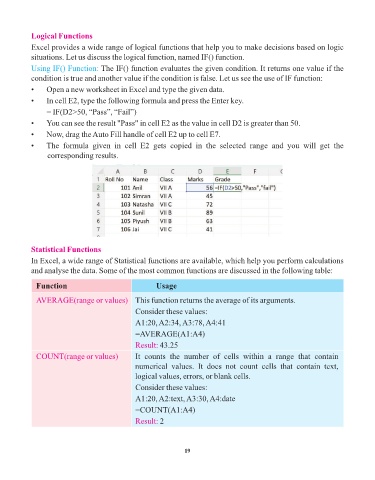
            •    Open a new worksheet in Excel and type the given data.
            •    In cell E2, type the following formula and press the Enter key.

                 = IF(D2>50, “Pass”, “Fail”)
            •    You can see the result "Pass" in cell E2 as the value in cell D2 is greater than 50.
            •    Now, drag the Auto Fill handle of cell E2 up to cell E7.

            •    The  formula  given  in  cell  E2  gets  copied  in  the  selected  range  and  you  will  get  the
                 corresponding results.


            Statistical Functions

            In Excel, a wide range of Statistical functions are available, which help you perform calculations
            and analyse the data. Some of the most common functions are discussed in the following table:

              Function                                 Usage

              AVERAGE(range or values)  This function returns the average of its arguments.
                                                Consider these values:

                                                A1:20, A2:34, A3:78, A4:41
                                                =AVERAGE(A1:A4)

                                                Result: 43.25
              COUNT(range or values)            It  counts  the  number  of  cells  within  a  range  that  contain
                                                numerical  values.  It  does  not  count  cells  that  contain  text,
                                                logical values, errors, or blank cells.

                                                Consider these values:
                                                A1:20, A2:text, A3:30, A4:date

                                                =COUNT(A1:A4)
                                                Result: 2


                                                                 19

