


Page 16 - Code Craft Computer-7
P. 16
Absolute Reference

            Absolute reference is used when you do not want to change the address of the cell while copying
            the formula to the other cell. To use absolute reference in a formula, you need to add Dollar ($)
            sign before the column and row number. For example, =$A$1+$A$2
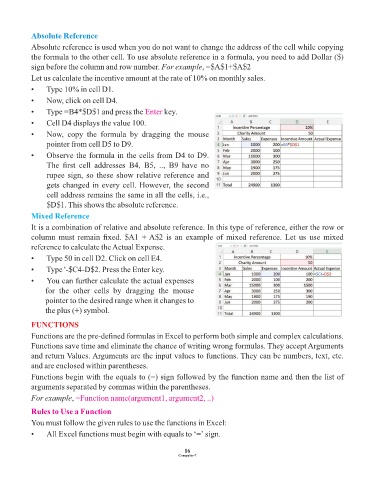
            Let us calculate the incentive amount at the rate of 10% on monthly sales.

            •    Type 10% in cell D1.
            •    Now, click on cell D4.

            •    Type =B4*$D$1 and press the Enter        key.
            •    Cell D4 displays the value 100.
            •    Now,  copy  the  formula  by  dragging  the  mouse
                 pointer from cell D5 to D9.

            •    Observe the formula in the cells from D4 to D9.
                 The  first  cell  addresses  B4,  B5,  ..,  B9  have  no
                 rupee sign, so these show relative reference and
                 gets changed in every cell. However, the second
                 cell address remains the same in all the cells, i.e.,

                 $D$1. This shows the absolute reference.
            Mixed Reference
            It is a combination of relative and absolute reference. In this type of reference, either the row or
            column must remain fixed. $A1 + A$2 is an example of mixed reference. Let us use mixed

            reference to calculate the Actual Expense.
            •    Type 50 in cell D2. Click on cell E4.

            •    Type '-$C4-D$2. Press the Enter key.
            •    You can further calculate the actual expenses
                 for  the  other  cells  by  dragging  the  mouse
                 pointer to the desired range when it changes to
                 the plus (+) symbol.

            FUNCTIONS

            Functions are the pre-defined formulas in Excel to perform both simple and complex calculations.
            Functions save time and eliminate the chance of writing wrong formulas. They accept Arguments
            and return Values. Arguments are the input values to functions. They can be numbers, text, etc.
            and are enclosed within parentheses.

            Functions begin with the equals to (=) sign followed by the function name and then the list of
            arguments separated by commas within the parentheses.
            For example, =Function name(argument1, argument2, ..)

            Rules to Use a Function
            You must follow the given rules to use the functions in Excel:

            •    All Excel functions must begin with equals to ‘=’ sign.


                                                                 16
                                                               Computer-7

