


Page 50 - Code Craft Computer-7
P. 50
FILTERING THE DATA

            The Filter   feature allows you to see only those records that you want to display, temporarily
            hiding the rest of the data from view. We can say that viewing only selective data that satisfies a
            given condition is known as filtering the data      . Filtering is different from sorting. Unlike sorting,
            filtering does not rearrange the data. To filter the data, follow these steps:
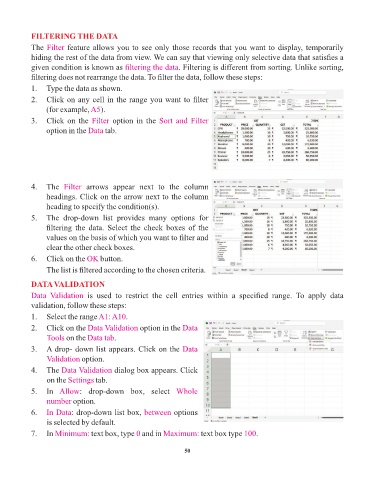
            1.   Type the data as shown.

            2.   Click on any cell in the range you want to filter
                 (for example, A5   ).
            3.   Click on the Filter    option in the Sort and Filter

                 option in the Data  tab.


            4.   The  Filter   arrows  appear  next  to  the  column
                 headings. Click on the arrow next to the column
                 heading to specify the condition(s).
            5.   The  drop-down  list  provides  many  options  for
                 filtering  the  data.  Select  the  check  boxes  of  the

                 values on the basis of which you want to filter and
                 clear the other check boxes.
            6.   Click on the OK    button.

                 The list is filtered according to the chosen criteria.

            DATA VALIDATION
            Data  Validation  is  used  to  restrict  the  cell  entries  within  a  specified  range.  To  apply  data
            validation, follow these steps:

            1.   Select the range A1: A10    .
            2.   Click on the Data Validation    option in the Data
                 Tools on the  Data tab.

            3.   A drop- down list appears. Click on the Data
                 Validation option.
            4.   The Data Validation     dialog box appears. Click
                 on the Settings  tab.

            5.   In  Allow   :  drop-down  box,  select  Whole
                 number option.
            6.   In Data  : drop-down list box, between      options
                 is selected by default.

                                                0
            7.   In Minimum:     text box, type  and in Maximum:      text box type 100   .

                                                                 50

