


Page 55 - Code Craft Computer-7
P. 55
Area Charts: Area charts are similar to line charts but the
            data point markers are not displayed and the area beneath the
            lines  is  filled  with  colour.  An  area  chart  emphasizes  the

            magnitude of change in data over time. It is mainly used for
            representing sales and production figures.


                                                Surface Charts: Surface charts allow you to display data across
                                                a 3D landscape. These work best with large data sets, allowing
                                                you to see a variety of information at the same time.


            Components of a chart
            A chart is described using various elements.
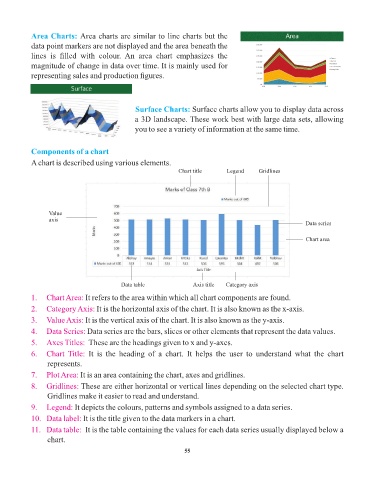
                                                               Chart title     Legend     Gridlines


                  Value
                  axis
                                                                                                           Data series

                                                                                                           Chart area


                                           Data table               Axis title  Category axis

            1.   Chart Area: It refers to the area within which all chart components are found.
            2.   Category Axis: It is the horizontal axis of the chart. It is also known as the x-axis.
            3.   Value Axis: It is the vertical axis of the chart. It is also known as the y-axis.

            4.   Data Series: Data series are the bars, slices or other elements that represent the data values.
            5.   Axes Titles:  These are the headings given to x and y-axes.

            6.   Chart  Title:  It  is  the  heading  of  a  chart.  It  helps  the  user  to  understand  what  the  chart
                 represents.
            7.   Plot Area: It is an area containing the chart, axes and gridlines.

            8.   Gridlines: These are either horizontal or vertical lines depending on the selected chart type.
                 Gridlines make it easier to read and understand.
            9.   Legend: It depicts the colours, patterns and symbols assigned to a data series.

            10.   Data label: It is the title given to the data markers in a chart.
            11.   Data table:  It is the table containing the values for each data series usually displayed below a
                 chart.

                                                                 55

