


Page 56 - Code Craft Computer-7
P. 56
CREATING A CHART

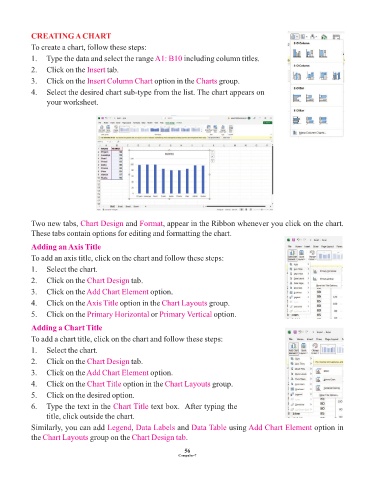
            To create a chart, follow these steps:
            1.   Type the data and select the range A1: B10      including column titles.
            2.   Click on the Insert  tab.

            3.   Click on the Insert Column Chart     option in the Charts   group.
            4.   Select the desired chart sub-type from the list. The chart appears on
                 your worksheet.


            Two new tabs, Chart Design      and Format   , appear in the Ribbon whenever you click on the chart.
            These tabs contain options for editing and formatting the chart.

            Adding an Axis Title
            To add an axis title, click on the chart and follow these steps:
            1.   Select the chart.

            2.   Click on the Chart Design    tab.
            3.   Click on the Add Chart Element      option.

            4.   Click on the Axis Title  option in the Chart Layouts    group.
            5.   Click on the Primary Horizontal     or Primary Vertical   option.

            Adding a Chart Title
            To add a chart title, click on the chart and follow these steps:

            1.   Select the chart.
            2.   Click on the Chart Design    tab.

            3.   Click on the Add Chart Element      option.
            4.   Click on the Chart Title   option in the Chart Layouts   group.
            5.   Click on the desired option.

            6.   Type the text in the Chart Title    text box.  After typing the
                 title, click outside the chart.

            Similarly, you can add Legend     , Data Labels    and Data Table   using Add Chart Element       option in
            the Chart Layouts   group on the Chart Design tab    .

                                                                 56
                                                               Computer-7

