


Page 53 - Code Craft Computer-7
P. 53
5.   Type the new value 405     as a result in To value : text box. In this box, always refer the cell that
                 contains formula.

            6.   Press the Tab  key and click on the cell
                 E3 in a worksheet. The address will
                 appear in the By changing cell:       text
                 box.
            7.   Click on the OK    button.

            8.   The  Goal  Seek  Status      dialog  box
                 appears on the screen displaying the
                 Target  value  405  and  Current  value
                 392. Click on the OK    button.

                 Observe the change in the cell E5.

            CONDITIONAL FORMATTING
            Conditional formatting is a feature in Excel that lets you apply formatting such as cell shading or
            font colour to a cell only when the cell contents satisfy a given condition. When the value of the

            cell meets the format condition, the selected formatting is applied to the cell. If the value of the
            cell does not meet the format condition, the default formatting is used.

             Note : Conditional formatting is a feature that allows you to set a cell’s format according to
             conditions that you specify.

            To apply conditional formatting, follow these steps:

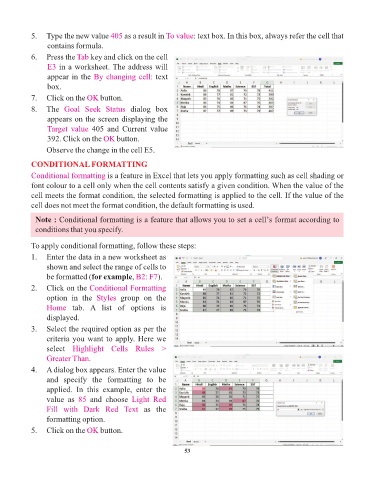
            1.  Enter the data in a new worksheet as
                 shown and select the range of cells to
                 be formatted (for example     , B2: F7 ).
            2.   Click on the Conditional Formatting

                 option  in  the  Styles   group  on  the
                 Home  tab.  A  list  of  options  is
                 displayed.
            3.   Select the required option as per the
                 criteria you want to apply. Here we
                 select  Highlight  Cells  Rules  >

                 Greater Than.
            4.   A dialog box appears. Enter the value
                 and  specify  the  formatting  to  be
                 applied.  In  this  example,  enter  the

                 value  as  85   and  choose  Light  Red
                 Fill  with  Dark  Red  Text  as  the
                 formatting option.
            5.   Click on the OK    button.


                                                                 53

